


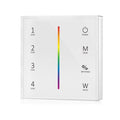
Variateur Tactile RGB RF en Saillie 4 Zones

Monochrome RF Touch Dimmer Surface Mounted 4 Zones

Ref. DIM-6374

Monochrome RF Touch Dimmer Surface Mounted 4 Zones

Ref. DIM-6374
Regular price 42,89 €
/

Up to -5% off in bulk: 40,75 € Incl. VAT each

Taxes included. Shipping costs calculated at checkout.
  • Only 14 left in stock!
  • Out of stock, shipping soon
PRO+ Save with Silumen Pro+ : up to -20% + 6% cashback View benefits
  • Warranty up to2 years
  • Secure payment
  • Dedicated advisor Pro
Don't forget the accessories8
RGB LED Strip 12V 5M 5050 Ref. 5M5050RGB-60IP44In stock
14,79 €Incl. VAT
Transformer 220V 12V IP67 36W DC 3A Ref. KSR-36W-12V-SIWAIn stock
11,99 €Incl. VAT
Product description

Do you want to customize your lighting without investing in multiple fixtures at once? Choose this 4-zone RF touch dimmer surface-mounted (available colors: monochrome and RGB). This essential accessory for adjusting the brightness of your lighting will change your life!

Advantages of the 4-Zone RF Touch Dimmer Surface-Mounted

Remote control of your LED strip

This dimmer is designed to control the brightness of your LED strip with a single gesture. You can easily switch from maximum brightness to low-intensity lighting and adapt your lighting to many situations. A single LED strip can provide soft ambient lighting, effective general lighting, or functional lighting to support your activities. This controller operates via RF and has a range of 30m.

An ingenious operating mode

Each "SCENE" button corresponds to a predefined brightness level, accessible directly by pressing it. For example, you can assign the maximum brightness delivered by your strip to the "SCENE 1" button. To do this, set your strip to its maximum brightness, hold the corresponding button for 2 seconds to save the scene, and you’re done. Repeat the same process for the other buttons on your dimmer by setting different brightness levels.

Multiple pairing options

To perform the basic pairing, hold the MATCH button on your dimmer for 5 seconds, then press a zone on your dimmer. Press the MATCH button again for 5 seconds to cancel the pairing. Zones 1, 2, 3, and 4 allow you to control multiple strips. To pair your dimmer with your strip and assign a new zone, turn off your strip via the power supply, turn it back on, and press the zone to be paired 3 times. Using one dimmer per zone is necessary to create multiple lighting zones.

Also check out our selection of remote controls for LED strips to make controlling your LED strips easier.

Technical specifications

Electrical
Voltage3V
Frequency50-60Hz
Current20 mAh
Dimensions
Dimensions8.5 x 8.5 cm
Length85 mm
Width85 mm
Installation
Installation typeIn heat
Ingress protectionIP20
Product
CertificationsCE & RoHS
Warranty2 years

Downloads

Find all the technical documentation and the declaration of conformity for this product.

Compliance (1)

Explore related categories3

Browse the ranges this product belongs to.

Questions & answers2

Our technical team answers our customers' questions.

What type of receiver/dimmer should this dimmer be used with?

This RF touch dimmer works exclusively with RGB LED strips and must be paired with a compatible RF receiver/dimmer. One dimmer per zone is required if you wish to control multiple zones independently.

Answer from the Silumen technical team

Can this dimmer be used outdoors?

No, this dimmer has an IP20 protection rating, which means it is intended for indoor use only, away from any water spray or moisture.

Answer from the Silumen technical team