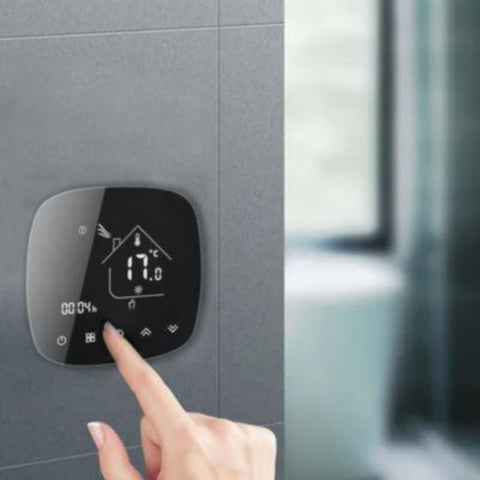





Understanding the role of the smart thermostat
As a rule, a Wi-Fi heating system does not come with a built-in feature that lets it connect to the Wi-Fi network on its own. To communicate with your home Wi-Fi, your heating needs an additional accessory that links the heating system to the wireless network: the smart thermostat.
The smart thermostat is the modern version of the conventional thermostat, an accessory originally designed to regulate the temperature of your heating efficiently. Its upgraded version, however, the Wi-Fi smart thermostat, plays a pivotal role in a connected heating system. Beyond setting the heating temperature, the smart thermostat acts as a bridge between the heating and the Wi-Fi. In other words, it is the way a smart thermostat works that turns your heating into a Wi-Fi connected heating system. In most cases, the smart thermostat is inseparable from Wi-Fi heating, since the heater cannot connect to the Wi-Fi network by itself.
Benefits of Wi-Fi connected heating
Using a Wi-Fi connected heating system comes with many benefits that make everyday life easier. Compared with a traditional heater or boiler that you have to adjust by hand, smart heating is far more convenient to use. What is more, the Wi-Fi connection unlocks a whole range of practical features that make a smart heating system even more appealing, starting with remote control and the ability to schedule operating times.
The many smart features of Wi-Fi connected heating make it all the more worthwhile in the long run, especially in terms of energy consumption. Heating is generally one of the most energy-wasting systems in a home. To reverse this trend, connected heating over Wi-Fi gives you real-time energy monitoring. You gain a clear picture of how your heating behaves and can optimise its performance. All you need to do is adjust your habits based on the data collected, so you save energy while improving your thermal comfort.
What you need to connect your heating to Wi-Fi
Offering extra comfort, ease of use and better heating performance, Wi-Fi connected heating has a lot going for it, especially if you already have a home automation ecosystem in place. Keen to enjoy the many benefits of a smart heating system? You can quite easily connect your existing heater to your Wi-Fi network by installing a smart thermostat in the system. You should, however, make sure your heating actually supports this feature. You may also need to configure your Wi-Fi network before setting up the connection.
Is your heating Wi-Fi compatible?
To enjoy the smart features of a connected heating system, you do not necessarily need to replace your entire installation. You can turn your heater into connected heating with a compatible smart thermostat. Of course, the heater must be Wi-Fi compatible, which means able to work with a smart thermostat. In general, most heating systems are Wi-Fi compatible and support the operation of a suitable smart thermostat.
Electric heaters are among the most common types of heating compatible with a Wi-Fi connection. Once fitted with a smart thermostat for electric radiators, they become Wi-Fi connected electric heaters and benefit from all the related features. The same goes for most water boilers, water heaters, underfloor heating and heat pumps: you simply need to pair them with the right smart thermostat.
So, to connect your existing heating to your Wi-Fi network, take care to choose a compatible smart thermostat. A conventional gas boiler will naturally require an additional smart thermostat for gas boilers to link it to your home wireless network. Note, however, that some manufacturers offer electric heaters with built-in Wi-Fi that do not require a separate thermostat.
Configuring your Wi-Fi network
Your home Wi-Fi network plays a key role in installing and commissioning your connected heating system. Needless to say, you will need a good Internet connection at home to install smart heating and enjoy its many benefits. In addition, depending on the heater or smart thermostat you choose, your home Wi-Fi network may need a specific configuration before the connected heating can be installed:
- First, make sure your network is secure, to best protect the data generated by your Wi-Fi heating and by your home automation ecosystem as a whole.
- Check that the frequencies supported by your Wi-Fi router (2.4 GHz or 5 GHz) are compatible with the connected heating. Some smart thermostats may require a specific frequency.
- Set up your router to meet the needs of your smart heating system. Commissioning some Wi-Fi heating systems requires opening certain ports, configuring a static or dynamic IP address, and so on. Refer to the smart thermostat user manual to find out the installation requirements.
- If necessary, install a ZigBee Wi-Fi smart gateway, also known as a home automation hub. This device brings all your smart devices, including your smart heating, together on a secure network dedicated to your home automation ecosystem. It prevents your Wi-Fi router from becoming overloaded and may even be essential if you choose a smart thermostat that uses the Zigbee protocol.
Steps to connect your heating to Wi-Fi
Have you checked that your heater is Wi-Fi compatible and configured your home network to allow smart heating to be installed? All that remains is to connect your heating system to Wi-Fi and install the whole setup. If you do not have a heater yet, or want to redo your entire installation, you will first need to choose a compatible heating system.
Choosing a connected heating system
With so many different heaters on the market, it is not always easy to find your way around. To choose the most suitable connected heating system, we recommend basing your choice on:
- The heater's Wi-Fi compatibility: choose a system that works with a smart thermostat. You can also opt for Wi-Fi connected electric heaters with the feature built in.
- Your needs and expectations in terms of energy consumption: some heaters are known to use less energy than others. While a smart heating system does reduce the amount of energy a heater consumes, it is best to choose a model that is energy-efficient in the first place. Wood stoves, heat pumps and storage heaters are among the most popular choices.
Installing a connected heating system
The installation steps for a connected heating system vary from one type of heating to another. Installing and commissioning a connected electric radiator is not done the same way as a water boiler or central heating, from choosing the location to making the various connections. Ideally, you should call in a technician who specialises in heating installation to make sure everything goes smoothly. The initial hardware installation is a crucial step that should never be taken lightly, so it is best left to an expert.
Once the heater is in place, you can install the smart thermostat. Here again, the installation steps depend on the thermostat model chosen, so refer to the installation manual supplied with the device. Generally speaking, you will need to:
- Fix the thermostat's wall bracket or mounting plate in the chosen location, using the screws provided.
- Connect the smart thermostat wires to the heating, always following the instructions in the installation manual. The wiring of a smart thermostat for electric heating is not the same as that of a smart thermostat for water boilers.
- Attach the smart thermostat to its wall bracket.
If in doubt, you can also ask the technician who installed your heating system to take care of this.
Configuring Wi-Fi heating
Once all the equipment making up your Wi-Fi connected heating is installed, all that remains is to set up the connection between the heating system and the wireless network. The network setup process may differ depending on the smart thermostat model you use. However, it will always include:
- Downloading the mobile app used to manage and remotely control your Wi-Fi connected heating: for the models available on Silumen.com, you will need the Smart Life or Tuya Smart app to complete the Wi-Fi heating setup. Also make sure the mobile device on which you downloaded the app is connected to the same Wi-Fi network as the one you will configure the heating on.
- Creating a user account: the app will ask you to log in or create a user account to continue the setup.
- Pairing the smart thermostat with the Wi-Fi network: simply follow the on-screen instructions to connect the thermostat, and therefore your smart heating, to your home Wi-Fi. Some models require you to press a « Pairing Mode » or « Wi-Fi Mode » button on the thermostat. The app may also ask you to enter the Wi-Fi SSID and password.
- Setting your preferences: once the heating system is connected to Wi-Fi, all you need to do is configure the settings to suit your needs and preferences. You can set precise operating times, choose the target temperature or set up voice control if the feature is supported.
How do you control your heating remotely over Wi-Fi?
Being able to control your heating temperature remotely over Wi-Fi is one of the many benefits of a smart heating system. No need to get up and adjust the thermostat by hand: simply open the remote control app for your connected heating on your smartphone. You are greeted by a user interface from which you can set the heating temperature or switch it on and off without moving.
You can also automate the operation of your connected heating system over Wi-Fi by scheduling custom time slots based on your routine.
Finally, you can set up remote voice control for your connected heating if the thermostat model used in your smart system supports it. This is generally the case with the smart thermostats in the Silumen catalogue. Voice control via Google Assistant or Amazon Alexa lets you control your Wi-Fi heating without opening the app on your phone. Just give the command to your smart voice assistant (Google Home or Amazon Echo) and it takes care of the rest.
Wi-Fi thermostat: how does it work?
The Wi-Fi thermostat is an essential component when setting up a connected heating system. Unless you have an electric heater with built-in Wi-Fi, fitting a Wi-Fi thermostat to an existing heater is the only way to turn it into connected heating. How does it work? The Wi-Fi thermostat creates a wireless link between the heater and your mobile device by connecting it to your home Wi-Fi network. This gives you remote access to the settings of the thermostat, and therefore of the connected heating system, and also lets you track its energy consumption.
How does a smart thermostatic head work?
Not to be confused with the smart thermostat, the smart thermostatic head, also called a smart radiator valve, is a device that lets you control the temperature of different rooms in the house separately. The smart thermostat sets the target temperature of the central heating, whereas thermostatic heads only regulate the temperature of a single water radiator. If you use a water boiler for central heating, heat is distributed through the house via water radiators placed in the various rooms. The hot water produced by the boiler is carried to the radiators, which in turn heat the space they are in.
Thermostatic heads work alongside the central thermostat and let you assign a different temperature to each of your water radiators, so you can heat each room differently. The device fits directly onto the radiator pipe to regulate the flow of hot water through it. Thermostatic valves also have temperature sensors that measure the room temperature in real time and adjust the radiator temperature accordingly.
Securing your connected heating
A connected heating system pays off handsomely in the long run. However, do not overlook the security of your installation if you want to enjoy smart heating with complete peace of mind. Using this connected system inevitably generates personal data that needs protecting. To do so, remember to secure your smart heating connection by making sure you:
- Strengthen your Wi-Fi password, use a reliable security protocol (WPA3 or WPA2) and enable the router firewall to prevent any unwanted intrusion on the network.
- Set up a separate network for your connected heating and the rest of your home automation ecosystem. For extra security, you can also install a home automation hub and connect your smart heating to it.
- Regularly update the smart thermostat firmware to fix any security vulnerabilities in the system.
Troubleshooting Wi-Fi connection problems with connected heating
Like any household appliance, a connected heating system is not immune to faults. Some malfunctions are easy to fix yourself, while other, more serious problems may require a professional.
Common connection problems
As with any smart device, connection problems are among the most common faults with a Wi-Fi heating system. In most cases, these minor issues are easy to fix. The most frequent problems include:
- Loss of Wi-Fi connection: the link between the connected heating (the smart thermostat) and your home Wi-Fi is interrupted. The problem may come either from the router or from the thermostat itself, so restart them one after the other to restore the link. If the problem persists, reset the thermostat and set up the connection again.
- Intermittent connection drops: if your Internet connection is unstable, check the stability of your Wi-Fi network. If necessary, restart your Internet router. Also make sure to move any sources of interference (electronic devices) away from the router.
- App malfunctions: is the heating remote control app not working properly? Check whether an update is available. Otherwise, try uninstalling and reinstalling the app.
- Smart thermostat malfunctions: if your smart boiler thermostat shows signs of erratic behaviour, first check that its firmware has the latest manufacturer updates. If the fault persists, reset the device.
Find all our tips for solving problems with your smart thermostat here.
When should you call a professional?
Faults that can affect your Wi-Fi connected heating system range from a lost connection fixed by a simple restart to complex error messages beyond the scope of a non-specialist. If you have tried every troubleshooting solution within your reach and the problem persists, it is better to call in a professional. The same applies to obvious hardware damage (damaged wires, broken components). Finally, if in doubt, do not hesitate to contact the retailer's or manufacturer's technical support. They can also advise you on whether a repair technician needs to be called out to fix your Wi-Fi connected heating.