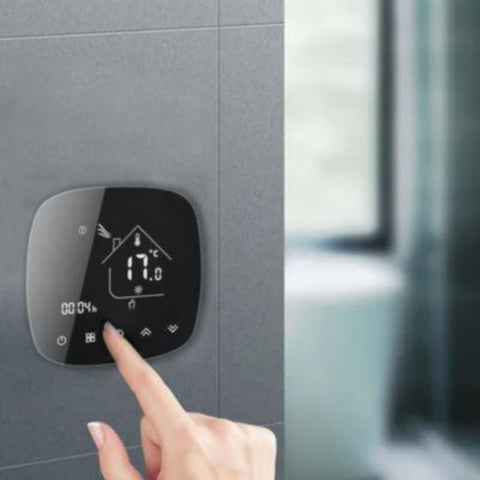





The basics of a smart thermostat
Smart thermostats are an intelligent, upgraded version of the conventional thermostat, a device used alongside a heating system to regulate and control its temperature. While both versions of the device, the conventional model and the smart model, serve the same purpose, a smart thermostat works slightly differently. Beyond setting and maintaining the room temperature in a given room, the connected, intelligent version offers revolutionary features.
How a smart thermostat works: sensors and data collection
The smart thermostat is an innovative technological product specifically designed to enhance a home automation ecosystem and make your home all the more comfortable. How a smart thermostat works has been carefully thought through to set and maintain the ideal temperature at all times in the rooms where it is installed. To achieve this, the connected device is equipped with sensors that allow it to collect data about its surroundings and regulate the home's temperature accordingly.
The built-in sensors of a smart thermostat
How do smart thermostats work? How does this small intelligent device manage to set the optimal temperature precisely, in summer as in winter, to make your home pleasant to live in? The answer lies in their built-in sensors. Depending on the model, a smart thermostat may include different types of sensors that allow the device to analyse its environment. All smart thermostat models are necessarily equipped with temperature sensors, an essential component for the device to work properly. The most sophisticated models may also have presence, humidity, light or even air quality sensors. They all work together to enable smart, optimal and tailored management of the indoor climate.
How do these built-in sensors collect environmental data in real time?
Sensors are at the heart of how a smart thermostat works. It is thanks to these built-in sensors that the device can regulate itself and intuitively adapt your heating temperature to the conditions detected at any given moment. The various on-board sensors accurately collect data throughout the device's operation on room temperature, the weather, the number of people in the room and humidity levels. To do so, they use advanced technologies that convert these factors into measurable data, which the smart thermostat's microprocessor then processes to carry out commands. These parameters are measured automatically.
How a smart thermostat works: connectivity and remote control
The whole point of using a smart thermostat is being able to integrate it into your home automation system thanks to its wireless connectivity, which unlocks a range of innovative features that make indoor climate control easier. This is also the main notable difference between how a smart thermostat and a standard model work: the connected version lets you control and programme your heating remotely with ease.
The connectivity technologies used by a smart thermostat
Smart thermostats on the market come in a wide range of models, which you choose according to various criteria and your preferences. Besides the types of on-board sensors, a smart thermostat is also defined by the communication protocol it uses, like any connected object. The most common models use Wi-Fi, the Zigbee protocol, Bluetooth or Z-Wave. Thermostats that connect via Wi-Fi communicate directly with your mobile device through your home internet network. Zigbee smart thermostats, on the other hand, require a compatible gateway to be installed. This technology is popular for setting up a stable, efficient home automation ecosystem.
How can users control the thermostat remotely?
Smart thermostats let you control your heating system remotely via dedicated mobile apps or through your smart voice assistant. To do this, the device must be connected to your heating or radiator and to the Wi-Fi or your home automation gateway, depending on the protocol used by the chosen model. In some cases, the smart thermostat can also communicate directly with your mobile device via Bluetooth. The app that comes with the thermostat generally provides a user-friendly interface that brings together all the settings for the smart thermostat. You can also give voice commands or programme the thermostat to make everyday life easier.
Remote control with a smart thermostat
As a connected object, the smart thermostat lets you control it without having to go and adjust it by hand. You can either adjust your heating settings via the dedicated app's interface, or programme the smart thermostat to create automated scenes with the rest of your ecosystem.
Remote control of an electric radiator
The smart thermostat is a device designed to allow remote control of any type of modern heating system. It can therefore be used to control an electric radiator remotely. Having an electric radiator with a built-in thermostat does not stop you from installing a separate smart thermostat. The smart device can perfectly well take the place of the radiator's original thermostat to give you access to remote control features. However, make sure you choose a compatible model. You can find them in Silumen's range of smart thermostats for electric radiators.
Controlling a boiler remotely
Using a boiler, whether water or gas, does not stop you from enjoying the many practical benefits of installing a smart thermostat. How does it work? Simply choose a smart thermostat compatible with the type of heating you use and you're all set. In this case, you need a smart boiler thermostat (for water and/or gas boilers). Note that not all thermostats are suitable for all types of heating.
Controlling water-based heating
You can control water-based heating remotely with a smart thermostat designed specifically for this type of system. With this in mind, Silumen offers the smart thermostat for water-based heating.
Integrating the smart thermostat with voice assistants
A smart thermostat's connectivity, whether Wi-Fi, Zigbee or Z-Wave, means that as well as operating it remotely, you can control it through your voice assistant, just like any other smart object in your home automation ecosystem. Of course, to do this you need to link the thermostat to your smart speaker. How does it work? You can either set up the voice assistant directly from the settings of the thermostat control app, or make the link via the Google or Amazon app.
Guide to connecting the thermostat to Google Home
Do you own a Google Nest smart speaker? Good news! The smart thermostat you bought from Silumen is compatible with this voice assistant device. To link the two connected devices, you need to:
- Download the Google Home app on your mobile device.
- Tap "Set up device" in the app interface, then "Works with Google".
- Switch on the previously installed smart thermostat, then search for it in the list shown.
- You will be asked to enter the login details you used for the thermostat control app, then to allow access to the thermostat's data.
- Name your thermostat to make voice commands easier.
Guide to connecting the thermostat to Alexa
Do you have an Amazon Echo speaker? Use Alexa to control your smart thermostat, and therefore your heating, remotely. Connect the smart thermostat to the speaker by following these steps:
- Install the Amazon Alexa app on your mobile.
- Select "Add device" from the drop-down menu at the top left, then "Set up a device" > "Thermostat".
- Find your thermostat in the list shown, then log in to the account used in the thermostat app to allow access to the data.
- Rename the thermostat.
Using voice control to adjust the temperature
Voice control is one of the many benefits of using a connected object in a home automation ecosystem, and the smart thermostat is no exception. How does it work? Simply activate your voice assistant with the specific wake words "OK Google" or "Alexa", followed by the setting you want. For example, you could say: "Alexa, set the master bedroom temperature to 22°C". Top tip: name the thermostat after the room to make voice commands simpler and more effective.
Setting the desired temperature with the smart thermostat
Using a smart thermostat for your heating system gives you a lot of freedom in terms of control, temperature settings and customisation to achieve optimal comfort at home. In particular, this smart device makes your heating easier to run by letting you operate it remotely or programme its settings based on defined scenes.
How do you set the desired temperature on the smart thermostat using an app or a voice assistant?
The way your smart thermostat works lets you interact with the device, and by extension with your heating, in several ways. In particular, you can choose between using the interface of the thermostat's dedicated mobile app and your virtual voice assistant, Google Assistant or Alexa. The mobile app interface, Tuya Smart in the case of the smart thermostats offered by Silumen, is fairly simple to use, clean and user-friendly. The temperature can be set manually from the app's home screen or automatically via the option to schedule daily and weekly scenes. Alternatively, you can simply ask your voice assistant to raise or lower the temperature for you!
Customising heating settings for optimal comfort
Using a smart thermostat gives you the freedom to customise your heating system's settings as you see fit, and even to automate and control its operation remotely. To do this, you first need to understand how the smart thermostat works so you can get the most out of it. To ensure optimal thermal comfort in your home, remember to:
- Set the smart thermostat's set temperature, i.e. the temperature you find comfortable. You can also set an optimal temperature range.
- Set up daily time schedules: this lets the smart thermostat regulate the temperature automatically throughout the day.
- Create specific scenes to automate your thermostat's behaviour with the rest of your home automation ecosystem.
Using smart thermostatic heads to regulate the temperature in different rooms
The smart thermostat connects directly to your central heating and provides remote control and direct access to your boiler. Its primary role is to maintain a room temperature you find comfortable (the set temperature) throughout your home. Generally, the unit is placed in a reference room (a central room) and sets the tone for the rest of the home. In itself, the smart thermostat provides overall control of the temperature in your living space.
However, you can go further and heat each room differently by opting for smart thermostatic heads, which can be used on their own or alongside the room thermostat. Unlike the latter, this connected valve is fitted directly onto a room's radiator and allows you to control that room's temperature specifically. You can then control the temperature in each room of your home separately, remotely and more precisely, while respecting the set values defined on the central thermostat. This solution is all the more suitable if you have a large home, maximising your thermal comfort and the resulting energy savings.
Energy savings and the environment
Heating is undeniably one of the biggest sources of energy consumption in a household. Yet, given its essential role, you cannot do without it. The solution lies in installing a smart thermostat which, as well as unlocking the full potential of the heating system, optimises its energy efficiency. Whether you use water-based heating, an electric radiator or a boiler, the smart thermostat is an essential ally for saving money on running the system. How? Thanks to the detailed tracking of heating consumption data that the smart thermostat provides! This in turn lets you adjust your settings effectively to reduce the amount of energy used and make your heating more environmentally friendly, without compromising your comfort.
Security and data protection
Security, when it comes to home automation and connected objects, is a crucial issue that must be taken very seriously, given how a smart thermostat works with data collection. As no system is foolproof, it is strongly recommended that you:
- Update the thermostat's firmware regularly to get the manufacturer's latest security patches.
- Secure and/or encrypt your home Wi-Fi network. You can also choose to use a different network, which is one reason, for example, to opt for the Zigbee protocol for a more secure ecosystem.
- Read the manufacturer's privacy policy, for the sake of data confidentiality. This is particularly important when choosing the ideal smart thermostat.
- Control and secure access to the smart thermostat and every part of the ecosystem.