




Google Home: a popular home automation control app
Google Home has become an extremely popular app with people who want to stay in control of their devices and smart devices. In practical terms, with Google Home you can control and manage various devices in your home without moving an inch! It is an app, which means you can install it on a smartphone or tablet to remotely control certain devices, including a Google Home compatible smart thermostat. Imagine the time saved and the convenience you will enjoy every day with an app like this.
Understanding Google Home smart thermostats
Most people have already heard of radiators connected to Google Home, but do not really know how a Google Home compatible smart thermostat works. Connected heating linked to Google Home is particularly worthwhile, as it will make your life easier. If you want to fully understand Google Home compatible smart thermostats, read on.
The different types of Google Home smart thermostats
First of all, you should know that there are many types of Google Home smart thermostats. The main types are:
- The smart thermostat for electric radiators.
- The smart thermostat for gas boilers.
- The smart thermostat for water heating.
- The smart thermostatic head.
So, to use a radiator connected to Google Home, you first need to determine what your current heating system is. This will tell you which Google Home smart thermostat to go for.
How it works
A Google Home smart thermostat is relatively simple to use. Google Home takes the form of a small wireless speaker that uses your Internet network to communicate with your Google Home smart thermostat. To control your heating remotely, simply download the dedicated app to your smartphone or tablet. Then, after the initial setup, you can control your Google Home compatible smart thermostat from the app, wherever you are.
The benefits of a Google Home smart thermostat
The main benefit of a Google Home compatible smart thermostat is convenience. From your smartphone or tablet, you can easily adjust your heating temperature remotely. You can also switch it on or off without having to move. Wondering what the point of a Google Home smart thermostat is? The answer is simple: it can help you save up to 35% on energy. Imagine the money you could save on your electricity bill!
Preparing for installation
Have you never used a Google Home smart thermostat before? In that case, there are a few details you need to know, such as compatibility, installation and the tools required.
Thermostat compatibility with Google Home
The first thing to do is to check that the thermostat is compatible with Google Home. Not all thermostats are compatible, so not all of them can be controlled remotely. If in doubt, do not hesitate to contact us before making your purchase.
Tools and equipment needed
As for the tools and equipment needed for your Google Home smart thermostat, rest assured that you will need almost nothing. Put simply, you will need a smart thermostat, the Google Home wireless speaker, an Internet connection and a smartphone or tablet.
Installing the smart thermostat
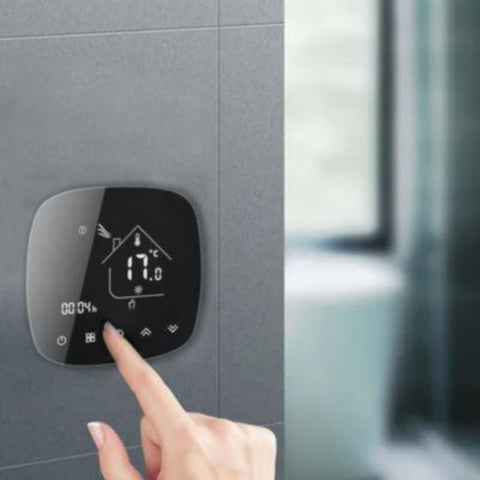
Before you can enjoy all the benefits of your Google Home smart thermostat, you first need to install your Wi-Fi thermostat. It usually takes the form of a small unit that you can fix to a wall. This thermostat is very easy to install and does not require any particular building work.
Integration with Google Home
Once your thermostat is installed, you need to integrate it with Google Home. Here again, you will have no trouble completing this integration and configuring the settings. Find out the detailed procedure below.
Guide to adding the thermostat to the Google Home app
To add your thermostat, first download the Google Home app to your tablet or smartphone. Then open the app and tap the « + » at the top left of your screen. Next, select « Set up device » and choose your Google Home smart thermostat. That is all there is to it: your thermostat is now linked to Google Home. Occasionally, an error message may appear. If this happens, unlink your thermostat in the Google Home app and then link it again.
Configuring Google Home settings and routines to control the thermostat
Configuring Google Home settings and routines to control the thermostat is done from the Google Home app. Depending on the thermostat model, you have access to different settings that let you easily manage the temperature inside your home. Some Google Home smart thermostats even let you control hot water or enter your daily routine to save even more time.
How the Google Home smart thermostat works and how to use it
Now that everything is installed and properly configured, you can get down to business and make the most of your smart thermostat. How it works may differ from one thermostat to another, as some brands offer more features than others. Overall, however, the basic features remain the same. Here is how to make good use of your new equipment.
How does the smart thermostat maintain a comfortable temperature?
Most smart thermostats offer two main features:
- Scheduling: this lets you set the temperature in each room of your home remotely. Some thermostats have several preset modes.
- Regulation: this lets you set the temperature of your choice in advance, and the thermostat regulates the temperature itself to match the one you have set. With this feature, your home stays warm and pleasant.
Using Google Home voice commands to control the thermostat
Google Home is a small wireless speaker with a built-in loudspeaker that responds to voice commands. This means you can control your thermostat with the sound of your voice. It is so simple that you will soon wonder how you ever managed without it. To use voice commands, say « Hey Google » or « OK Google » followed by the command of your choice, such as « Turn down the temperature » or « Turn off the heating ». As you can see, it is very easy to control your heating with Google Home voice commands.
Maximising energy efficiency with a smart thermostat
A smart thermostat is a really worthwhile investment. Year after year, the price of electricity keeps rising, and some people end up with exorbitant bills. It is therefore necessary, even vital, to save energy in order to bring your bills down. With a smart thermostat, you can adjust the temperature of your home even when you are not there. For example, if one day you go out and forget to turn off the heating, imagine the money you would lose by heating your home needlessly all day. With a smart thermostat, you can turn off your heating from your phone and avoid wasting energy.
Data security and privacy protection
With a connected device, you are entitled to wonder about the security of your data, confidentiality and the protection of your privacy. On this point, you can rest assured: Google offers optimal security and protects your privacy. Admittedly, Google collects all kinds of data about you, but it is kept secure. Google does not sell your personal data or your audio recordings. When you use voice commands, your conversations remain private. In other words, you can use a smart thermostat with no risk and without worrying about your data or your privacy.
You now know all about Google Home smart thermostats, their benefits and how they work. All that remains is to choose the thermostat you want from all our models and enjoy it. As you will have seen throughout this article, using this kind of equipment is easy. So do not wait any longer: if you want to save energy and money, invest in a smart thermostat, you will not regret it. More and more people are making this choice, so why not you?