Variateur Tactile Monochrome RF en Saillie 4 Zones

Surface-Mounted RF Touch Dimmer Single Colour 4 Zones

Ref. DIM-6375

Surface-Mounted RF Touch Dimmer Single Colour 4 Zones

Ref. DIM-6375
Regular price 62,89 €
/

Up to -7.5% off in bulk: 58,18 € Incl. VAT each

Taxes included. Shipping costs calculated at checkout.
  • Out of stock, shipping soon
PRO+ Save with Silumen Pro+ : up to -20% + 6% cashback View benefits
  • Warranty up to2 years
  • Secure payment
  • Dedicated advisor Pro
Don't forget the accessories8
14,89 €Incl. VAT
Transformer 220V 12V IP67 36W DC 3A Ref. KSR-36W-12V-SIWAIn stock
11,99 €Incl. VAT

Product description

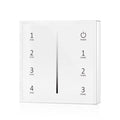
Want to customize your lighting without investing in several light fixtures at once? Choose this 4-zone surface-mounted RF touch dimmer (compatible with single-color LED strips). This essential accessory for adjusting your lighting's brightness will change your life!

Benefits of the 4-Zone Surface-Mounted RF Touch Dimmer

Remote control for your LED strip

This dimmer is designed to adjust your LED strip's brightness with a single touch. You can easily switch from maximum brightness to a dim glow and adapt your lighting to suit a wide range of situations. One LED strip can provide soft mood lighting, effective general lighting, or functional lighting for your activities. This RF controller has a range of 30 m.

A clever operating mode

Each "SCENE" button corresponds to a preset brightness level that you can activate with a single press. For example, you can assign the maximum brightness of your LED strip to the "SCENE 1" button. To do this, set your strip to maximum brightness, then hold down the corresponding button for 2 seconds to save the scene. That's all there is to it. Repeat the same process for the other buttons on your controller, setting them to different brightness levels.

Several pairing options

To pair a device, hold down the MATCH button on your dimmer for 5 seconds, then press one of the zones on your controller. To cancel pairing, hold down the MATCH button again for 5 seconds. Zones 1, 2, 3, and 4 let you control multiple LED strips. To pair your controller with your strip and assign it to a new zone, switch off your strip at the power supply, switch it back on, then press the zone you want to pair 3 times. LYou'll need one dimmer per zone to create multiple lighting zones.

Also discover our selection of remote controls for LED strips to make controlling your LED strips easier.


Technical specifications

Electrical
Voltage3V
Frequency50-60Hz
Current20 mAh
Dimensions
Dimensions8,5 x 8,5 cm
Length8,5 cm
Width8,5 cm
Installation
Installation typeEn saillie
Ingress protectionIP20
Product
CertificationsCE & RoHs
Warranty2 ans

Downloads

Find all the technical documentation and the declaration of conformity for this product.

Technical documentation (1)

DatasheetSpecifications, dimensions and references FRENDEESPTITNL PDF Download · EN

Compliance (1)

Discover the alternative

The professional version, with superior performance
Discover the Pro+ range
5-year warranty
50,000h lifespan
99.5% reliability
Adjustable 3-CCT
Linkable

Explore related categories3

Browse the ranges this product belongs to.

Questions & answers3

Our technical team answers our customers' questions.

Ce variateur fonctionne-t-il avec tous les types de rubans LED ?

Ce variateur est compatible uniquement avec les rubans LED monochromes. Il ne peut pas être utilisé avec des rubans LED RGB, RGBW ou à variation de température de couleur.

Answer from the Silumen technical team

Un récepteur est-il inclus ou faut-il l'acheter séparément ?

Ce variateur fonctionne par radiofréquence et doit obligatoirement être associé à un récepteur (dimmer RF) vendu séparément. La charge maximale supportée dépend du récepteur que vous choisissez.

Answer from the Silumen technical team

Peut-on contrôler plusieurs rubans LED indépendamment avec ce seul variateur ?

Oui, ce variateur gère jusqu'à 4 zones d'éclairage indépendantes. Toutefois, un récepteur par zone est nécessaire pour créer plusieurs zones distinctes.

Answer from the Silumen technical team