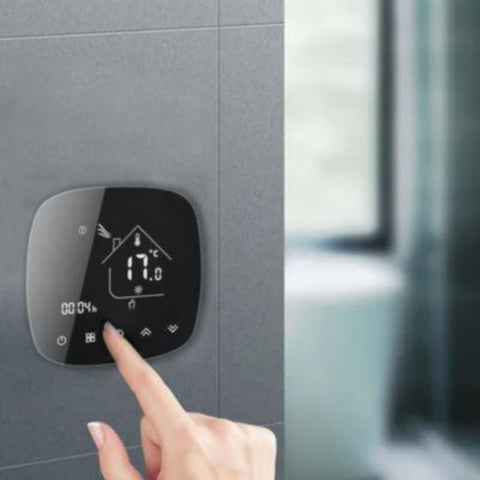





What is heating programming?
Programming your heating means setting the time slots and temperatures you want for your home in advance. Your heating system then adapts automatically to your daily needs, keeping the temperature comfortable at any time of day. For example, by fitting a programmable thermostat to your heating, you can set it to come on shortly before you wake up so the house is at just the right temperature, and to lower the temperature or switch the heating off while you are out.
The difference between programmed and non-programmed heating
Programmed heating uses preset settings to heat your home efficiently and consistently, unlike non-programmed heating, which runs manually or continuously and is often inefficient. With a programmed thermostat, you can avoid consumption peaks and wasted energy by heating only when you need to.
The benefits of programming your heating
Comfort and well-being
Programming your thermostat keeps the temperature just right at all times, which makes everyday life noticeably more comfortable. You can tailor the heating periods to your schedule, so your home is always warm and welcoming. For example, you can set a higher temperature in the morning and evening, and a lower one at night or during the day when the house is empty. This precise control greatly improves thermal comfort for everyone and creates a pleasant, healthy environment.
Energy savings
By optimising your smart heating with precise programming, you can significantly reduce your energy consumption. By not heating your home unnecessarily, you make substantial savings on your energy bills. Smart heating management lets you save money while keeping your home comfortable.
Simplicity and automation
Programmable heating systems are designed to be easy to use. Once the initial settings are done, your heating runs on its own, adjusting automatically to your needs. This automation makes your heating easier to manage, for a more pleasant, hassle-free experience.
Environmental impact
Programming your home heating also helps reduce your carbon footprint. By using energy resources more efficiently and cutting waste, you are actively helping to protect the environment. Optimising energy use through programming is an eco-friendly approach that benefits the planet.
How do you programme your heating?
To programme your heating effectively, follow these essential steps:
- Install the thermostat: the first step is to install your smart thermostat correctly. Depending on the type of heating in your home, you will need to install a specific type of thermostat that is compatible with it.
- Install the Silumen Home app: download and install the free Silumen Home app on your smartphone or tablet. The app lets you control and programme your heating remotely.
- Pair the thermostat with the app via a Zigbee gateway: pair your thermostat with the app using a Zigbee gateway. The Zigbee gateway plays a key role in connecting your devices to your smart home ecosystem.
- Programme the heating: once the thermostat is connected and paired, you can set the time slots and temperatures you want directly in the Silumen Home app.
Installing and using a programmable thermostat
Before installing a programmable thermostat, you first need to know which type is compatible with your heating:
- Water radiator: use a smart thermostatic head. This type of thermostat fits directly onto the radiator and allows precise control of its temperature. The thermostatic head for a water radiator is installed on the body of its thermostatic valve.
- Electric radiator: use a pilot wire thermostat, which controls one radiator at a time for fine-tuned management of your heating. This type of thermostat must be installed close to the radiator and to a power supply, so that the radiator can be connected to the thermostat and the thermostat to the mains.
- Electric underfloor heating: use a smart thermostat for electric underfloor heating, perfect for optimal control of your heating.
- Water or gas boiler: use a smart boiler thermostat. It lets you manage the heating throughout the whole house.


Install the Silumen Home mobile app and pair the thermostat with the app using a Zigbee gateway
The Silumen Home app is a free, intuitive tool that lets you control your connected devices, including your thermostat, from your smartphone or tablet. Its user-friendly interface makes managing your heating simple and efficient. It offers advanced features such as custom scenes, device groups and real-time energy consumption monitoring.
Zigbee gateways are essential for integrating your connected devices into a smart home. They act as a bridge between Zigbee devices and the local network, enabling communication between different connected devices. This gives you smooth, secure control of your thermostats from a single interface: here, the Silumen Home app. With a Zigbee gateway, you get reliable connectivity and efficient synchronisation of all your connected devices, for smooth, responsive automation.
To pair your thermostat with the Silumen Home app via a Zigbee gateway, follow these steps:
- Install the Zigbee gateway: place the Zigbee gateway near a power socket, plug it in and connect it to your Wi-Fi network following the instructions provided. Note that a Zigbee gateway only works on a 2.4 GHz Wi-Fi network. Then follow the steps to pair the Zigbee gateway with your smartphone in the Silumen Home app.
- Pair the thermostat: open the Silumen Home app and select "Add device". Choose the smart thermostat from the list of compatible devices. Follow the on-screen instructions to complete pairing via the Zigbee gateway. See our article "How to install a Zigbee gateway on Silumen Home" for detailed guidance on setting up your gateway and pairing it with Silumen Home.
Programming your heating in the app
- Open the Silumen Home app and log in to your account.
- Go to the "Thermostats" section and select the thermostat you want to programme.
- Choose "Schedule" mode.
- Set the temperatures and time slots you want for each part of the day (morning, afternoon, evening, night).
- Save your settings and activate the schedule.
The Silumen Home app offers standard heating modes to optimise energy use, such as "ECO", "Comfort" and "OFF", as well as advanced features such as "Holiday" and "Open window" modes for quick adjustments, plus smart programming that automatically adapts the temperature to your habits and the weather.
- Comfort mode: sets an ideal temperature to maintain when the house is occupied (21°C, for example).
- ECO mode: lowers the chosen Comfort temperature by about 3°C.
- OFF mode: puts the radiator on standby during long absences.


Sample programming scenarios
For a busy family, well-planned heating programming can greatly improve comfort and optimise energy use. Here is an example of settings for each part of the day, along with adjustments for weekends and public holidays.
Typical weekly schedule
- Morning (6 am - 8 am): raise the temperature to 21°C for a comfortable start to the day. This time slot warms up the house before everyone gets up.
- Daytime (8 am - 5 pm): lower the temperature to 17°C. The house is usually empty during these hours, so keeping the temperature lower saves energy.
- Evening (5 pm - 10 pm): set the temperature to 21°C so the home is pleasant when the whole family is back.
- Night (10 pm - 6 am): lower the temperature to 18°C. A slightly cooler temperature promotes restful sleep and saves energy.
Adjustments for weekends and public holidays
- Morning (8 am - 10 am): 21°C for a relaxed, comfortable start to the day.
- Daytime (10 am - 5 pm): 19°C to stay comfortable while limiting energy use.
- Evening (5 pm - 11 pm): 21°C for family activities and time to unwind.
- Night (11 pm - 8 am): 18°C for a peaceful night.
Typical winter schedule
In winter, it is essential to strike the right balance between comfort and energy savings. Here are some recommended temperatures for different times of day:
- Morning: 21°C for a pleasant start to the day.
- Daytime: 17°C to 19°C if the house is empty. If you work from home, you can keep occupied rooms at 20°C.
- Evening: 21°C for optimal comfort during family time.
- Night: 18°C for comfortable, economical sleep.
Typical summer schedule
Even in the warmer months, it is important to manage your heating system properly to stay comfortable and save energy. Here is how to adapt your heating schedule for summer:
- Morning: set the temperature to 18°C if needed to take the chill off the house after a cool night.
- Daytime: switch the heating off or set it to a minimum of 16°C to avoid waste.
- Evening: keep the temperature at 18°C if the evenings are cool.
- Night: switch the heating off or keep a very low temperature of 16°C.
Typical daily schedule using the modes already available in the app
- Morning: Comfort mode so the whole family wakes up comfortably.
- Daytime: OFF mode when no one is home.
- Evening: Comfort mode when everyone gets home.
- Night: ECO mode for a cooler but still comfortable night.
Using "holiday" mode for long absences
- Activate "holiday" mode on your programmable thermostat before you leave.
- Set the temperature to a minimum level (16°C) to prevent pipes from freezing while keeping energy use to a minimum.
- Schedule the return to a comfortable temperature a few hours before you get back, so you come home to a warm house.
Tips for staying comfortable while saving energy:
- Make the most of free heat from the sun by opening the curtains during the day.
- Check your home's insulation to avoid heat loss.
- Consider creating several weekly schedules to match changes in your routine. For example, if you know you often get home later than planned one day a week, adjust the heating start time.
- Divide your home into heating zones. Heat only the rooms you use often, such as the living room and bedrooms, and turn the heating down in less-used areas.
- Make sure your heating system is well maintained. Clean the filters and have the system checked regularly to keep it running at peak efficiency.
- Improve your home's insulation and make sure windows and doors are properly sealed. A good smart heating system combined with a well-insulated home will retain heat more effectively.
- Even if your heating is programmed, feel free to adjust the temperature manually if you feel too hot or too cold. Lowering the temperature by 1°C can cut your energy bill by 7%.
By following these thermostat programming examples, you can stay comfortable all year round while making significant energy savings. The key is to adapt the settings to your lifestyle and the seasons.