Pro+
SILUMEN SMART HOME


Single Wall Switch Connected Wifi Touch WHITE - Silumen Home
SKU: WHX01-WHT





Votre panier est vide
Découvrir nos produits
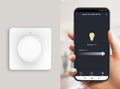
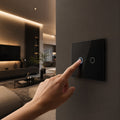
Upgrade your lighting setup with the Silumen WiFi touch connected switch. Stylish and discreet, it offers local or remote control via mobile app or voice assistant. An ideal smart home accessory combining aesthetics and performance.
This model combines aesthetics with advanced features. The tempered glass touch interface offers smooth and responsive control, while compatibility with major smart home platforms allows seamless lighting management. Automation, scheduling, or voice control: your comfort is in your hands. Thanks to the timer function, you can schedule automatic on/off for your lights. Smart scenarios let you adapt the switch’s behavior to your lifestyle (presence detection, schedules, weather, etc.). You can also manage multiple devices at once by grouping them by zones via the app for efficient centralized control.
With a power of 1000W per button, this connected switch is suitable for many rooms: living room, kitchen, bedroom, hallway, or office. For installations with LED bulbs, do not exceed 300W. It manages a single light point with local or remote control. Ideal for residential or professional environments seeking smart lighting control without compromising style.
| Puissance | 500W |
| Équiv. incandescence | 2000W |
| Tension | 220 - 240V |
| Type de courant | AC |
| Fréquence | 433.92 MHz |
| Intensité | 10A |
| Dimensions | 8.5 x 3.5 cm |
| Longueur | 8,5 cm |
| Largeur | 8,5 cm |
| Épaisseur | 3,5 cm |
| Charge Maximale | 500W |
| Couleur | White |
| Forme du luminaire | Square |
| Matériaux | PC |
| Certifications | CE & RoHS |
| Garantie | 2 years |
| Temp. fonctionnement | 0°C to +40°C |
Accessoires et produits compatibles avec cet article.


Soyez le premier à poser une question sur ce produit.